



現場で効く、今週のデジタル道具 第6回
こんばんは、橋本のりこです。
AIに書いてもらった文章を、
コピーして、
メモ帳やメールに貼り付ける。
すると、
見慣れない記号が出てきます。
行の頭に「#」。
言葉の前後に「**」。
文字化けかな、と
思われる方も多いようです。
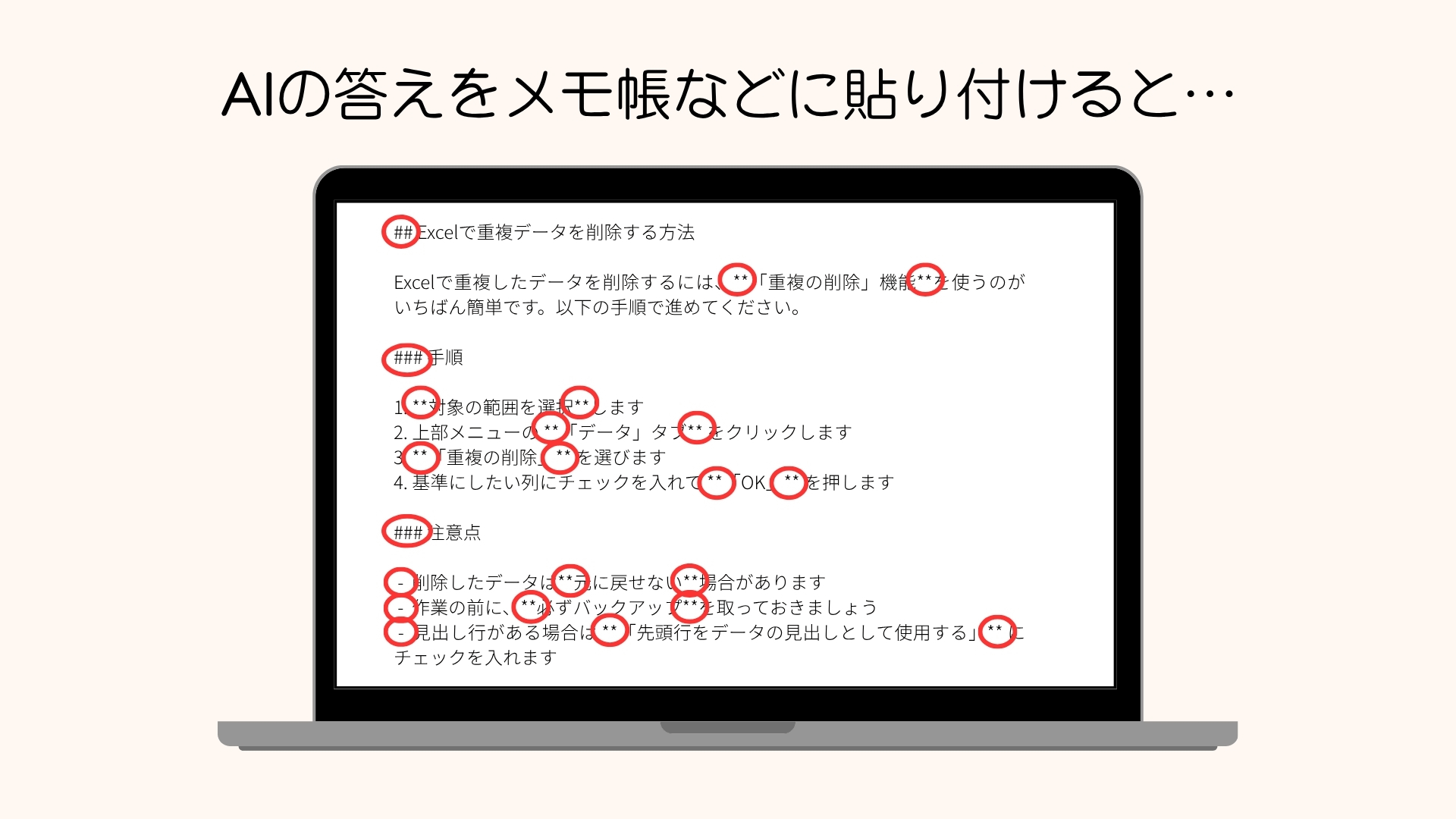
文字化けではありません
あれは、
マークダウンという書き方の記号です。
記号だけで、
「ここは見出し」「ここは太字」と
文書の形を伝えるための書き方です。
AIが文章を出すときの形として、
広く使われています。
覚えるのは、3つだけ
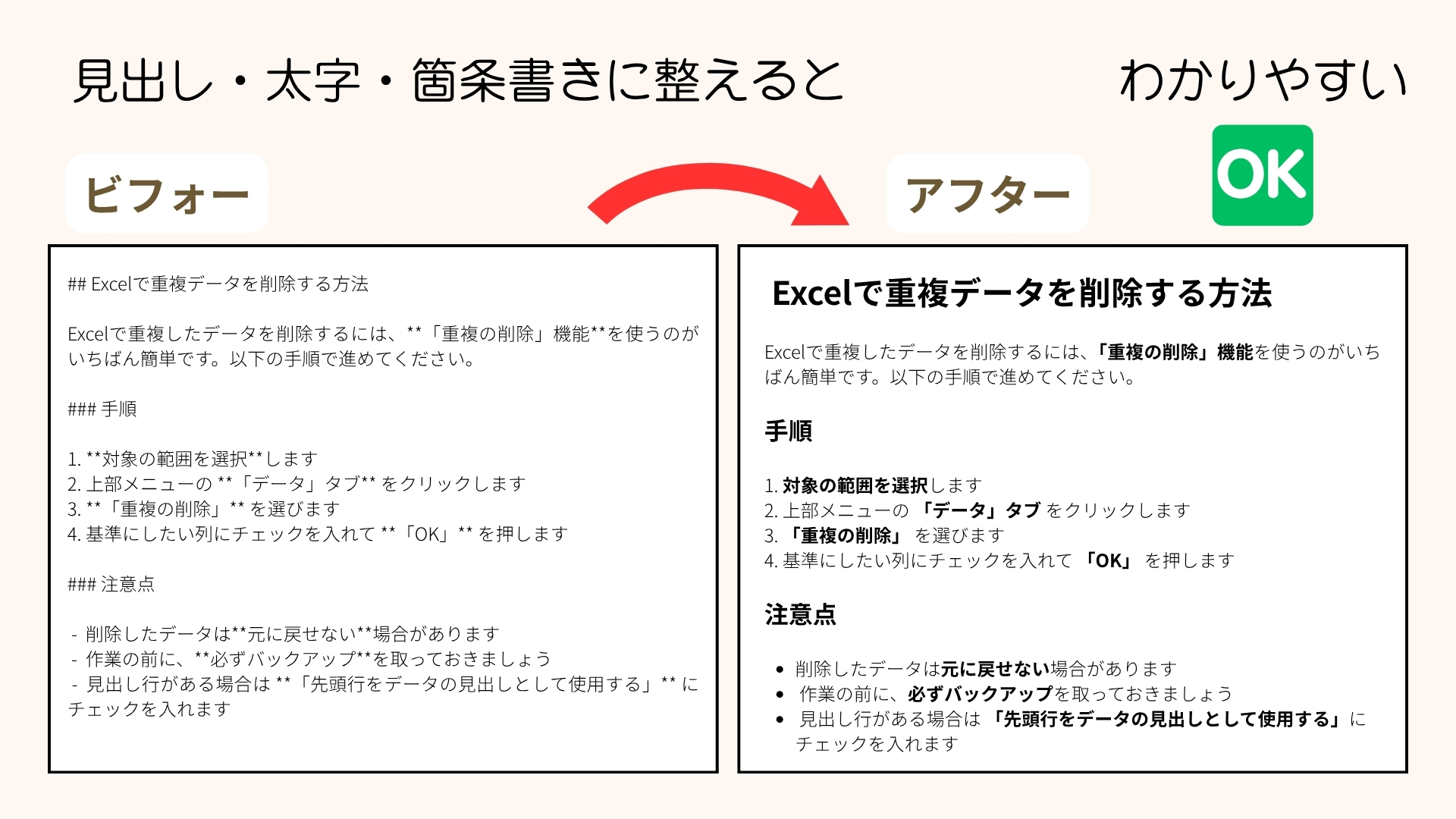
行の頭の「#」は、見出し。
「**」ではさんだところは、太字。
行の頭の「-」は、箇条書き。
ほかにも記号はありますが、
この3つを知っていれば、
ほとんど読めます。
私の場合
私がこの書き方を知ったのは、
AIを使い始めたころです。
一緒にシステムを作っていた仲間が、
教えてくれました。
「マークダウンで書くと、
AIに伝わりやすいよ」と。
それから、
AIへのお願いを書くときは、
この書き方を使うようになりました。
2年半ほど前には、
もうそうしていました。
だから、
AIの答えに「**」が付いていても、
太字の印だと分かっていました。
貼り付けるときは、
記号を消して、
太字に直していました。
たまたま、
教えてくれる人がいた。
それだけの違いです。
記号が残っていたら
貼り付けた文章に
「#」や「**」が残っていたら、
見出しと太字の印だと思って、
いらなければ消してください。
太字にしたいところは、
貼り付けた先の太字のボタンで
付け直せば十分です。
もうひとつ、
最初から出さない方法もあります。
AIに頼むときに、
「記号を使わずに書いてください」
と、ひとこと足す。
第3回でお話しした、
「これからは」と先に伝えておく方法も
使えます。

以前、気になっていたこと
noteを始めたころ、
「**」が残ったままの投稿を
よく見かけました。
「あれ? なんでこんなに*が」
と、最初は思いました。
でも、すぐに気づきました。
太字になる印だと、
知らなかっただけなんだ、と。
知っていれば、
消すのは数秒です。
そのひと手間で、
読む人には、
ぐっと読みやすくなります。
【note記事】ChatGPTで書いた文章、コピペしてそのまま使っていませんか?
ただ、ひとつだけ
この記号は、
貼り付ける先によって、
見え方が変わります。
整った形で表示してくれるものもあれば、
記号のまま出るものもあります。
Googleも今月から、
この書き方のファイルを、
Googleドキュメントで
そのまま開けるようにしました。
それだけ、
広く使われるようになった
ということだと思います。
ただ、
メモ帳やメールに貼り付けた文章の記号が、
自動で消えるわけではありません。
送る前に、
一度だけ見直してみてください。
覚えておくのは、ひとつだけ
「#」と「*」は、文字化けではない。
見出しと、太字の印です。
マークダウンの書き方を、
全部覚える必要はありません。
印の意味を、3つ。
それだけ知っていれば、
十分だと思います。
全部を覚えなくていい。
必要な色を、
ひとつずつ足していく。
今日の一色は、
「#は見出し、**は太字」です。
最後にひとつだけ、お願いがあります。
職場で、うまくいっていない作業はありませんか。
「これ、毎回めんどうだな」と思いながら
続けていることがあれば、
ぜひ教えてください。
次にご紹介する道具を選ぶときの、
いちばんの手がかりになります。
English Summary
You copy a piece of writing an AI produced, paste it into a text editor or an email, and unfamiliar symbols appear: a “#” at the start of a line, “**” on either side of a word. Many people seem to take this for garbled text.
It isn’t. Those are the marks of a way of writing called Markdown — a way of telling a document “this is a heading” or “this is bold” using nothing but symbols. It is widely used as the format AI writes in.
There are only three worth knowing. A “#” at the start of a line is a heading. Anything between “**” is bold. A “-” at the start of a line is a bullet point. There are other marks, but with these three you can read almost all of it.
I learned this when I first started using AI. A colleague I was building a system with told me, “Write it in Markdown — the AI understands it better.” From then on I used it whenever I wrote instructions for an AI; I was already doing so about two and a half years ago. So when an AI’s answer came back with “**” in it, I knew it was the mark for bold. When I pasted the text somewhere, I removed the symbols and made the words bold myself. I just happened to have someone who told me. That is the only difference.
If “#” or “**” is left in something you’ve pasted, think of them as the marks for a heading and for bold, and delete them if you don’t need them. For anything you do want bold, the bold button wherever you pasted it is enough. You can also stop them appearing in the first place: when you ask the AI, add “please write without symbols.” The approach from my third post — telling it “from now on” in advance — works here too.
When I started writing on note, I often came across posts with “**” still in them. At first I wondered why there were so many asterisks. Then I realized: people simply didn’t know it was the mark for bold. Once you know, removing them takes a few seconds, and that small effort makes the text far easier for the reader.
One thing to keep in mind: how these marks look depends on where you paste them. Some places show the text neatly formatted; others show the raw symbols. Starting this month, Google lets you open files written this way directly in Google Docs — a sign of how common it has become. But the symbols in text you’ve pasted into a text editor or an email don’t disappear on their own. Look it over once before you send.
The only thing worth remembering is this: “#” and “*” are not garbled text. They are the marks for a heading and for bold. You don’t need to learn all of Markdown — three marks are enough. Just add the colors you need, one at a time. Today’s one color: “# is a heading, ** is bold.”
And one last request. Is there something at work that never quite goes smoothly? If there is a task you repeat while thinking “this is such a hassle every time,” please tell me about it. It will be the best possible guide for choosing which tool to write about next.
橋本のりこ